Designing with Claude Code on Fable 5: what it takes
 Sharbel Safyi, CEO·Jun 12, 2026
Claude Code can do real design work now, and on Fable 5, Anthropic's most capable model, it is genuinely good at it. Getting the most out of it takes three things: installing the right skills, connecting the right tools like Figma and Canva, and wiring in image generation. Each is powerful on its own. Together they are also a real amount to set up and keep current.
The model finally got good enough to design
Start with the model, because it is what changed. Claude Fable 5, which Anthropic released in June 2026 as the most capable model it has made generally available, is the first one I would trust with design and not just code. Its lead over other models grows the longer and more involved the task gets, and design is exactly that: a long loop of trying something, looking at it, and adjusting.
But the model is the raw material, not the finished piece. On its own, Claude Code with Fable 5 will hand you a clean, working interface in whatever house style it defaults to. The gap between that and something that looks designed comes from what you build around it. There are three pieces, and this is the order I would add them.
One: install the right skills
A skill is the simplest of the three. In Claude Code, a skill is just a folder with a plain-text SKILL.md file: a name, a description, and a set of instructions the agent loads only when the task calls for it. The description sits quietly in the background; when your request matches it, Claude reads the full instructions and follows them. It is how you hand the agent a specific kind of expertise without spelling it out every time.
For design, the one I reach for is a skill called impeccable. It carries professional design judgment: visual hierarchy, typography and spacing, color, accessibility, motion and micro-interactions, and a firm bias against generic, AI-looking output. With it loaded, Claude stops handing you the safe default and starts making the small, opinionated choices that separate a real interface from a template.
The catch is everything around that. You have to know the skill exists, choose it from a growing pile of options, install it, and keep it current as the practice and the tooling move on. Knowing which skill to add, and when, is its own skill.
Two: connect the tools with MCPs and plugins
The second piece is connections, because most design does not live in a code editor. It lives in Figma, Canva, and a dozen other tools. The Model Context Protocol, or MCP, is the standard way to plug Claude into them, and the ecosystem is already large: there are around 10,000 public MCP servers. A plugin or MCP server is what lets Claude Code reach into a tool you already use instead of working in a vacuum.
Figma has an official one. Once it is connected, Claude Code can read your real design context, the components, variables, layout, and frames, and generate code from them, and it works the other way too: it can write back to the canvas and send a live web interface into Figma as editable layers. Your design file and your code stop being two separate worlds.
Canva connects the same way. Through its MCP server, Claude can create, resize, and export designs straight from your Canva account, using your own templates and assets, and Canva says millions of people have already used it inside Claude since it launched. Those are just two examples. The same pattern reaches Notion, Google Drive, your CMS, and much more. The catch, again, is upkeep: every connection has to be set up and authenticated, and the list of what exists, and how each piece behaves, keeps shifting under you.
Three: wire in image generation
The third piece is the one people skip, and it is what takes the work from a nicely coded page to a finished design. Claude Code can write layouts and pull in your Figma components, but it cannot conjure a hero image, an illustration, or a texture out of nothing. Connect it to a real image-generation model and it can, producing actual artwork instead of a flat CSS gradient sitting where a picture should be.
Here is the part I learned the hard way. Raw text-to-image gives you generic, off-brand pictures, the visual version of the flat AI voice everyone ends up with. Getting images that look like they belong to you takes more than a prompt. You have to feed the model your colors and style as a reference and hold every image to them. It is the same lesson as with words: the model is step one, and looking like yourself is the work that comes after. Since then I have written up exactly how we run image generation with Claude, and what keeps it on brand.
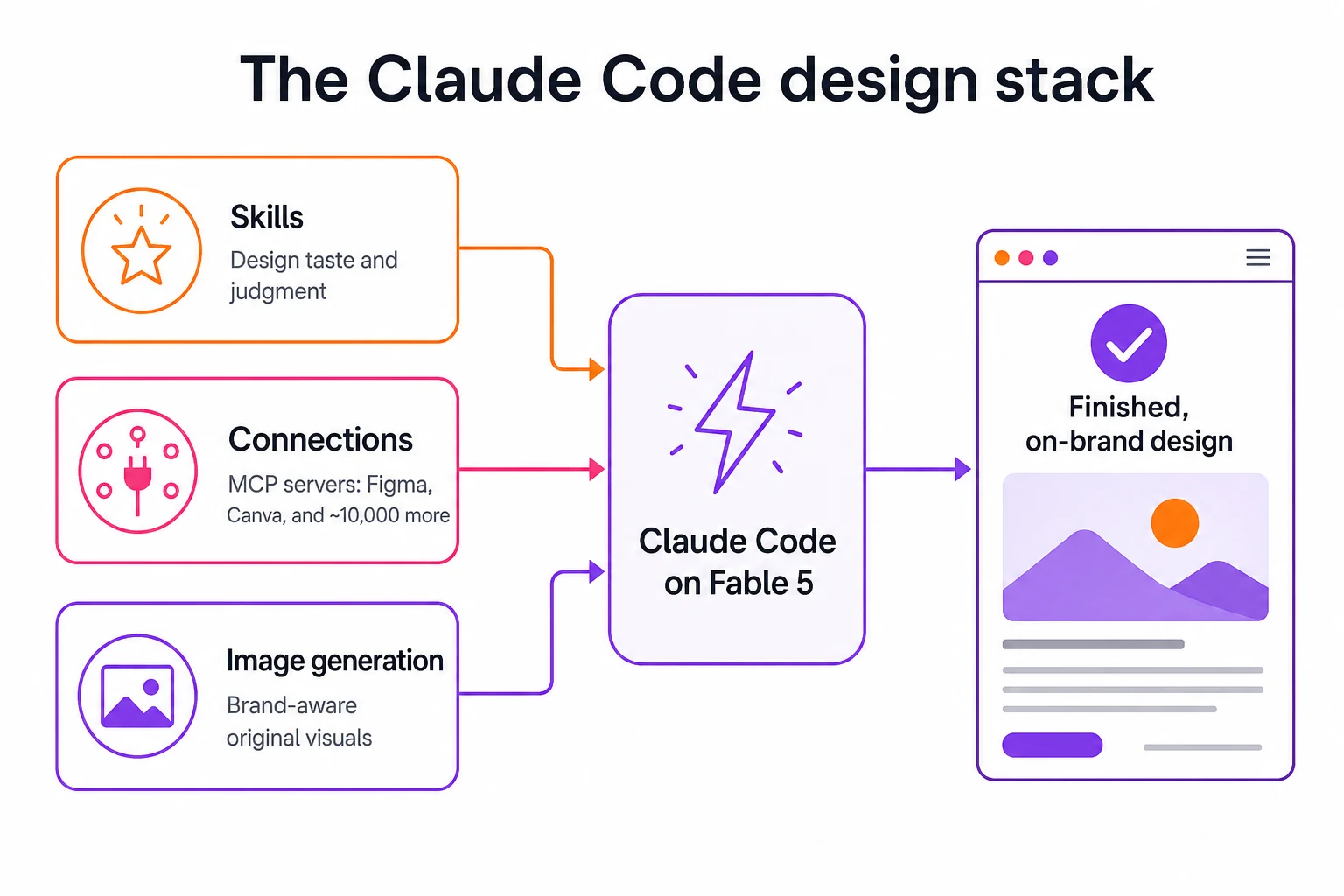
It works. It is also a second job.
Put all three together and Claude Code on Fable 5 will genuinely design for you. I do it, and it is impressive. It is also, honestly, a lot. You are no longer using a tool, you are maintaining a toolchain: choosing and updating skills, wiring and authenticating MCP servers, managing image-generation keys and brand references, and writing the prompts and copy that hold it all together.
And it does not hold still. Fable 5 only arrived in June 2026, the skill ecosystem grows every week, and there are already those thousands of MCP servers to keep track of. The setup that is current today needs re-checking in a month. If you enjoy that kind of work, the do-it-yourself path is real and worth taking. The point here is not that it cannot be done. It is that doing it well is a standing investment of time and attention, on top of the actual job you are trying to get done.
Or you let something keep the stack current for you
Which is the whole reason we built Marvin. The do-it-yourself stack I just described, the design taste, the brand-aware visuals, the image generation, the copy in your voice, is the same set of pieces we packaged into one tool, set up once and kept current for you, so you are not the one assembling and re-checking it every month. The best practices are built in and updated as the platforms and models change, the same way we argue you should build the engine before the strategy.
If you want to run the full do-it-yourself stack, now you know what it takes: the right skills, the right connections, and image generation, on a model finally good enough to use them well. If you would rather skip the assembly and just get on-brand design and content out the door, that is what Marvin is for.
Frequently asked
- What is a skill in Claude Code?
- A skill is a folder with a SKILL.md file: a name, a description, and instructions Claude loads only when a task matches the description. It is how you give the agent a specific expertise, like design judgment, without repeating yourself. The description stays in context, and the full instructions load on demand.
- Can Claude Code design with Figma and Canva?
- Yes. Both connect through the Model Context Protocol. With Figma's server, Claude Code can read your design context and write back to the canvas; with Canva's, it can create, resize, and export designs from your account. You connect each one, authenticate it, and keep it current as they change.
- Is Fable 5 good for design work?
- It is the strongest option I have used. Fable 5 is Anthropic's most capable generally available model, and its advantage grows on long, involved tasks, which is what design iteration is. The model alone gives a competent default; the design quality comes from the skills, connections, and images you wire around it.
- Do I have to set all this up myself?
- No. The do-it-yourself stack is powerful but a standing investment to build and maintain. Marvin packages the same pieces, design taste, brand-aware visuals, and copy in your voice, into one tool that stays current, so you get the output without assembling and re-checking the toolchain.