Can Claude Fable generate images? Yes, here's how
 The Marvin Team, Content & Growth·Jul 9, 2026
Claude does not generate images by itself, even on Fable 5. You connect an image model to it, and Claude becomes the director: it writes the prompts, reviews the results, and files the assets. We produce this site's marketing visuals that way, and the hard part is not making pictures. It is making pictures that belong to one brand.
How image generation with Claude actually works
The setup is a pair: Claude as the director and a dedicated image model as the painter. Claude cannot render an image, so you give it a small script or tool connection that calls an image model, then ask for what you need in plain language. Claude writes the detailed prompt, calls the model, looks at the result, and retries when it misses.
We run this on Claude Fable 5, and the model matters less for the pixels than for the direction: the better the director, the better the brief. If you want the full setup story, skills, tool connections, and image generation as the third piece, our CEO Sharbel wrote up what designing with Claude Code takes. This post is the marketing half: how the images that come out stay on brand.
Lesson one: describe your brand in words, not reference images
The reliable way to keep AI images on brand is a standing style description, in words, at the top of every prompt: your palette by name, your mood, your composition rules. We tried the obvious route first, attaching our brand artwork as reference images, and it backfired. Every diagram came back washed into soft watercolor, and the whole set read as amateur.
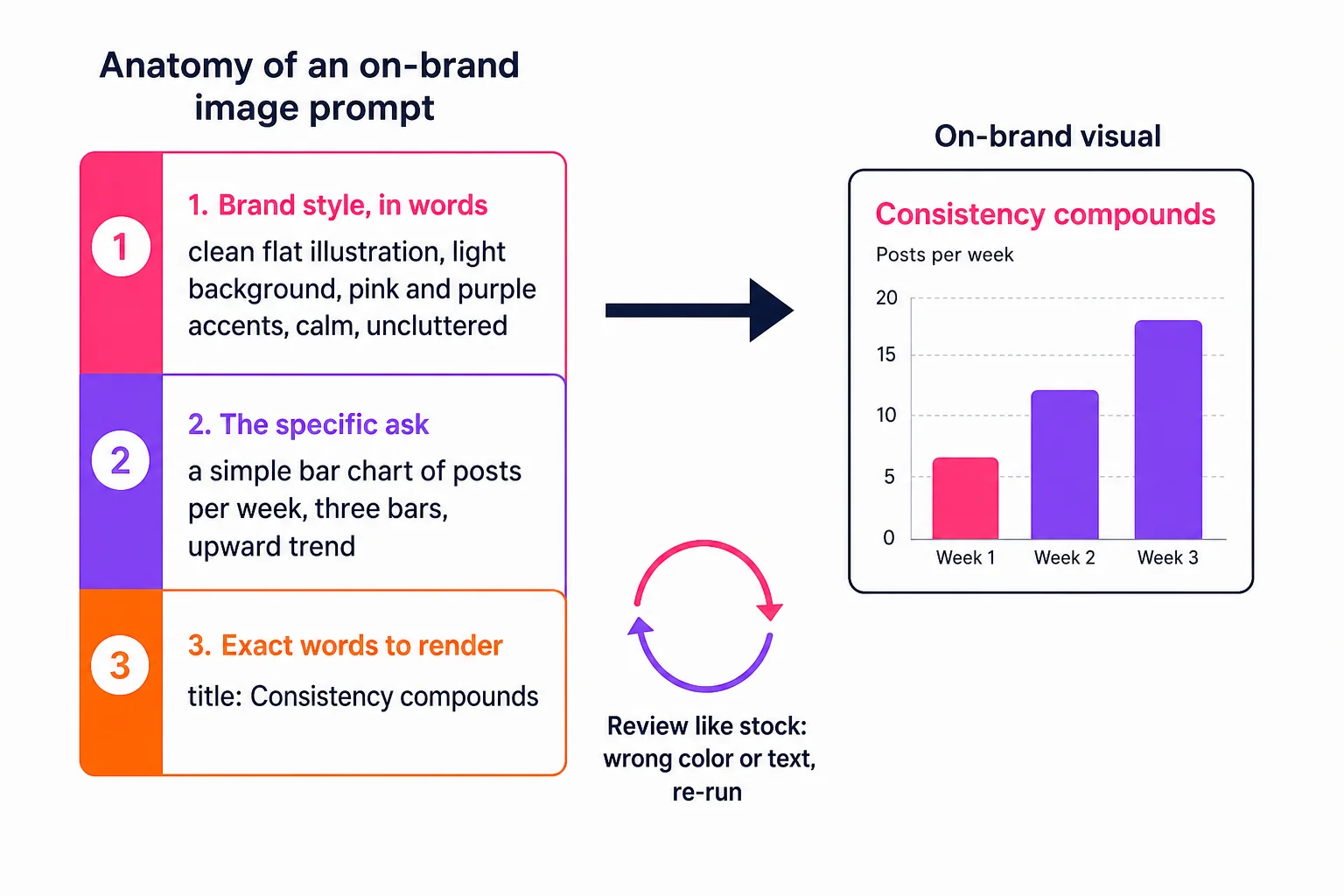
The words version worked immediately and has held up since. Ours reads like a house rulebook: clean, modern, flat illustration, light background, our pink and purple as accents, generous whitespace, no clutter. Every image request starts with that block, no exceptions, and that is most of the trick. Consistency comes from the first paragraph of the prompt never changing. The discipline is worth real money, too: Lucidpress found consistent brand presentation can lift revenue by up to 33%, and your images are the most visible place that consistency shows.
Lesson two: write the exact text you want on the image
Current image models can render real, readable text, so stop describing labels and start dictating them. Put the exact title, the axis names, and the numbers in the prompt, and the model paints them where they belong. Vague asks come back as gibberish lettering. Exact words come back as a finished diagram.
This changed what we use generation for. Instead of decorative art, we ask for teaching visuals: name the boxes, write the labels on the arrows, spell out the title. Detail does not confuse the model, it feeds it. The diagram in this post was made exactly this way, its three blocks and their sample text written out in the prompt, and what you see is what came back.
Lesson three: review it like stock photography
Treat every generated image as a stock-search result, not a final asset. Judge it the way you would judge a photo you were about to license: is the composition right, is the text correct, are the colors ours. If any answer is no, re-run it. Generating again is cheap. Publishing an off-brand image is not.
People are also better at spotting machine-made visuals than most brands assume, and they care. Getty Images' research across 30,000 adults in 25 countries found nearly 90% want to know whether an image was made with AI, and 98% say authentic visuals are pivotal to trust. The way to use these tools and keep that trust is to hold every image to your own standard, so it reads as yours and not as filler. Generic AI images are the visual version of the flat AI voice: they offend no one, they just quietly belong to no one.
What this takes to run
That is the whole system: a director model, a painter model, a standing style block, exact words, and a picky review. It genuinely works, and everything above applies with any decent image model, including Meta's new Muse Image. The honest caveat is upkeep. Prompts drift, models update, and the style block needs an owner, which is fine if tinkering with the pipeline is fun for you.
We keep ours running because making brand assets is literally our business. If it sounds more like a second job than a hobby, that is the part Marvin's Studio does out of the box, visuals generated in your brand's style without you owning the machinery. Either way, the three lessons hold: words over references, exact text, and a stock photographer's eye.
Frequently asked
- Can Claude generate images?
- Not by itself. Claude has no built-in image generation on any model, including Fable 5. The working pattern is Claude as director: you connect an image model through a small script or tool connection, and Claude writes the prompts, calls the model, reviews the output, and retries when it misses.
- How do I make AI-generated images match my brand?
- Write your brand as a standing style block, palette by name, mood, and composition rules, and start every prompt with it, unchanged. Consistency comes from that block never varying. In our pipeline, describing the style in words beat attaching brand reference images, which washed everything out.
- Can AI image models render readable text?
- Yes, current models render real text well. The rule is to dictate it: put the exact title, labels, and numbers you want in the prompt instead of describing them loosely. Vague requests come back as gibberish lettering; exact words come back as a finished, labeled diagram.
- Do AI-generated images hurt a brand's credibility?
- Careless ones can. Getty Images' global research found nearly 90% of consumers want to know when an image is AI-made, and 98% say authentic visuals drive trust. Images held to your brand's own style and standard read as yours; generic AI filler reads as belonging to no one.